
 antv-x6 入门
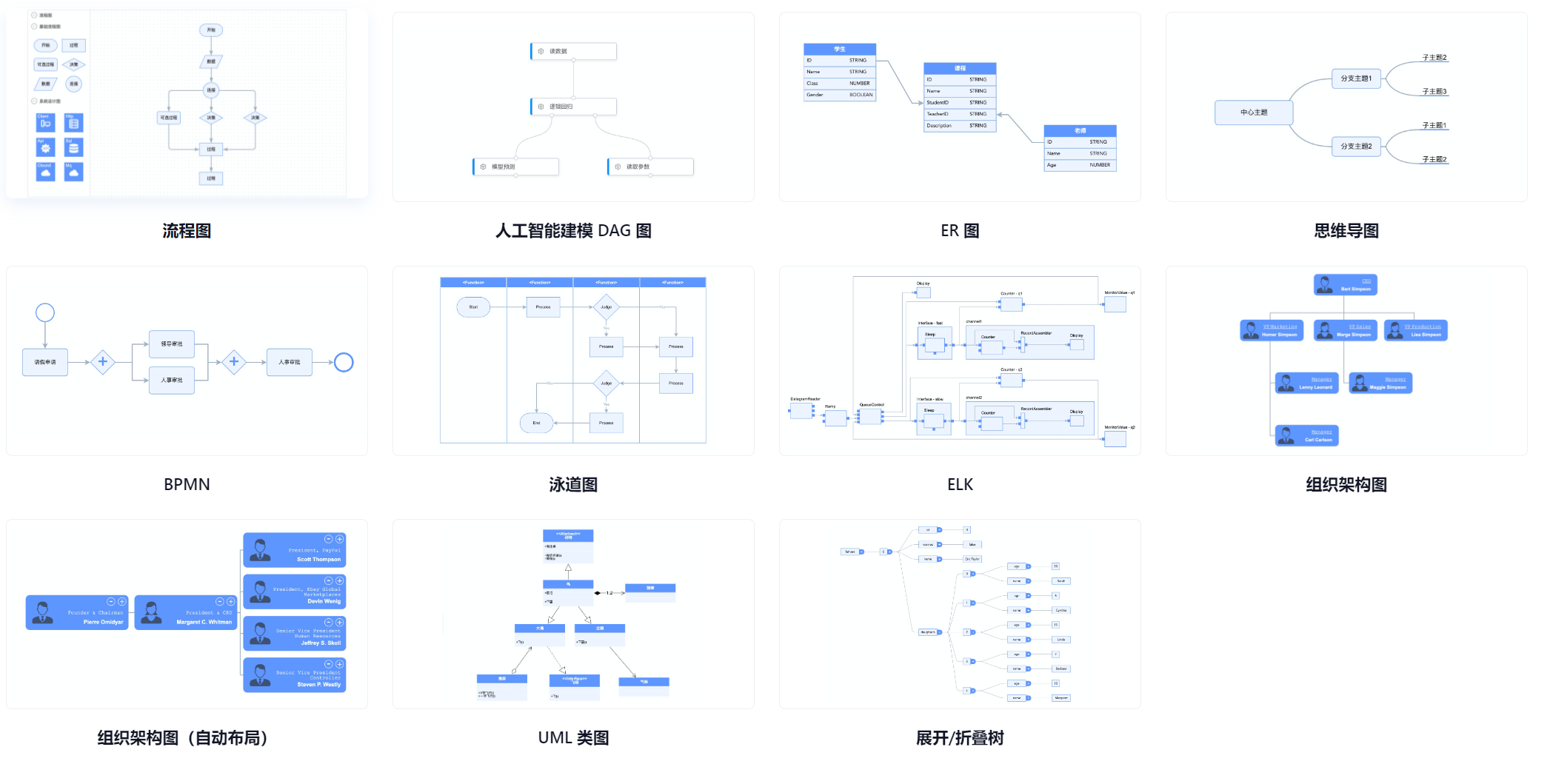
antv-x6 提供了一系列开箱即用的交互组件和简单易用的节点定制能力,方便我们快速搭建 DAG 图、ER 图、流程图等应用
# 简介
可以用来做什么?
# 入门
# 安装
npm install @antv/x6 --save
1
# 基本使用
- 创建容器
<div id="container"></div>
1
- 渲染画布
const graph = new Graph({
  container: document.getElementById("container"),
  width: 800,
  height: 600,
});
1
2
3
4
5
2
3
4
5
- 添加节点
graph.addNode({
  x: 200,
  y: 160,
  shape: "custom-node",
});
1
2
3
4
5
2
3
4
5
# 构造函数
# Graph
画布:承载所有绘制和操作的基础
# 构造函数参数
实例化参数可以在初始化画布的时候决定画布的一些基本参数和操作
- 决定画布的基础大小颜色位置
- 画布是否可以拖动,对齐线
- 画布基本操作禁用与启用:键盘快捷键,旋转,缩放,平移等
# 实例化方法
Graph 实例化之后,可以使用返回的对象调用方法,主要围绕节点和连接线
- addNode:添加节点到画布,返回添加的节点。
- getNodes:返回画布中所有节点。
- addEdge:添加边到画布,返回添加的边。
- hasCell: 返回画布中是否包含指定的节点/边。
- getCells:返回画布中所有节点和边。
- getNeighbors:获取邻居节点。
# 事件检测
主要用于绑定事件,检测用户操作
- 鼠标事件
- 画布缩放/平移
- 节点或边缩放/平移/旋转
- 节点嵌入
- 边连接/取消连接
- 节点或者边的添加/删除/修改
graph.on("cell:click", ({ e, x, y, cell, view }) => {});
graph.on("node:click", ({ e, x, y, node, view }) => {});
graph.on("edge:click", ({ e, x, y, edge, view }) => {});
graph.on("blank:click", ({ e, x, y }) => {});

graph.on("cell:mouseenter", ({ e, cell, view }) => {});
graph.on("node:mouseenter", ({ e, node, view }) => {});
graph.on("edge:mouseenter", ({ e, edge, view }) => {});
graph.on("graph:mouseenter", ({ e }) => {});
1
2
3
4
5
6
7
8
9
2
3
4
5
6
7
8
9
# Cell
Cell 是 Node 和 Edge 的基类,包含节点和边的通用属性和方法定义
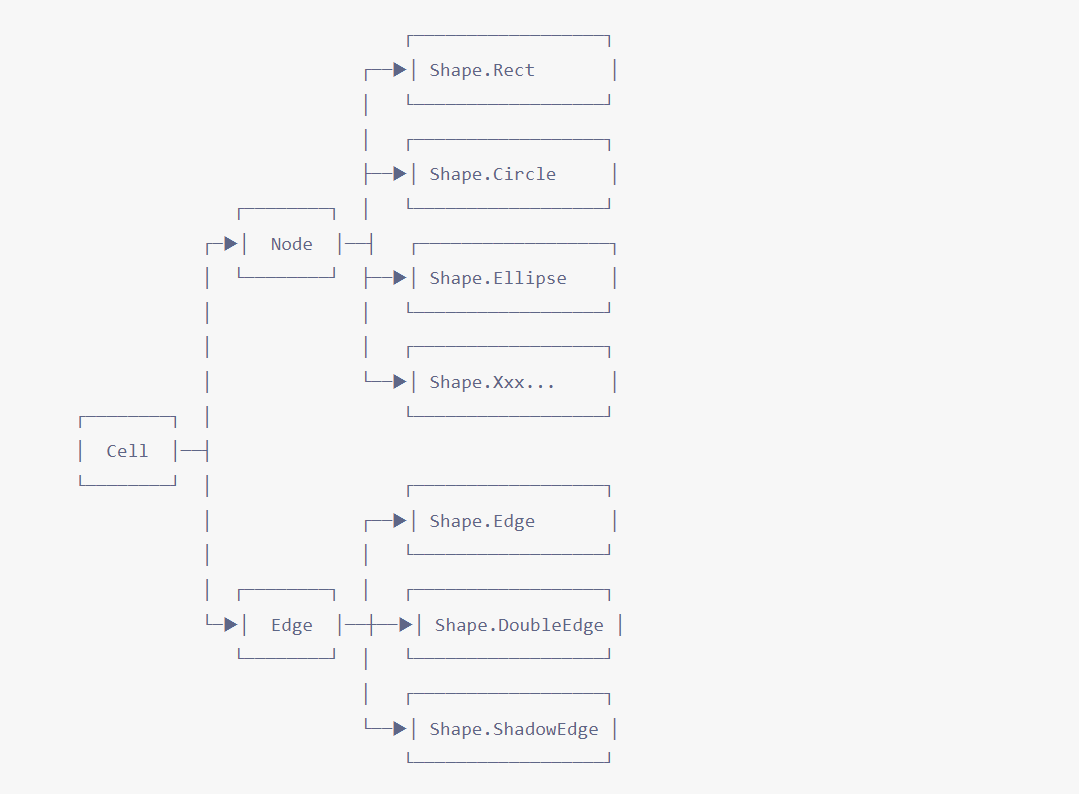
我们可以使用这些图形的构造函数来创建节点/边,然后调用 graph.addNode 或 graph.addEdge 方法将其添加到画布。
import { Shape } from "@antv/x6";

const rect = new Shape.Rect({
  id: "node1",
  x: 40,
  y: 40,
  width: 100,
  height: 40,
  label: "rect",
  zIndex: 2,
});

const edge = new Shape.Edge({
  id: "edge1",
  source: rect,
  target: circle,
  zIndex: 1,
});

graph.addNode(rect);
graph.addEdge(edge);
1
2
3
4
5
6
7
8
9
10
11
12
13
14
15
16
17
18
19
20
21
2
3
4
5
6
7
8
9
10
11
12
13
14
15
16
17
18
19
20
21
# 基本属性
除此之外,还包括一些基本的属性样式等
| 选项名 | 类型 | 默认值 | 描述 |
|---|---|---|---|
| id | String | undefined | 节点/边的唯一标识,默认使用自动生成的 UUID。 |
| markup | Markup | undefined | 节点/边的 SVG/HTML 片段。 |
| attrs | Object | { } | 节点/边属性样式。 |
| shape | String | undefined | 渲染节点/边的图形。 |
| view | String | undefined | 渲染节点/边的视图。 |
| zIndex | Number | undefined | 节点/边在画布中的层级,默认根据节点/边添加顺序自动确定。 |
| visible | Boolean | true 节点/边是否可见。 | |
| parent | String | undefined | 父节点。 |
| children | String | [] undefined | 子节点/边。 |
| data | any | undefined | 节点/边关联的业务数据。 |
# 节点类型
节点/边的图形,类似 MVC 模式中的 Model,决定了节点/边的数据逻辑
内置节点
构造函数 shape 名称 描述 Shape.Rect rect 矩形。 Shape.Circle circle 圆形。 Shape.Ellipse ellipse 椭圆。 Shape.Polygon polygon 多边形。 Shape.Polyline polyline 折线。 Shape.Path path 路径。 Shape.Image image 图片。 Shape.HTML html HTML 节点,使用 foreignObject 渲染 HTML 片段。 Shape.TextBlock text-block 文本节点,使用 foreignObject 渲染文本。 Shape.BorderedImage image-bordered 带边框的图片。 Shape.EmbeddedImage image-embedded 内嵌入矩形的图片。 Shape.InscribedImage image-inscribed 内嵌入椭圆的图片。 Shape.Cylinder cylinder 圆柱。 内置边
| 构造函数 | shape 名称 | 描述 |
|---|---|---|
| Shape.Edge | edge | 边。 |
| Shape.DoubleEdge | double-edge | 双线边。 |
| Shape.ShadowEdge | shadow-edge | 阴影边。 |
# Port
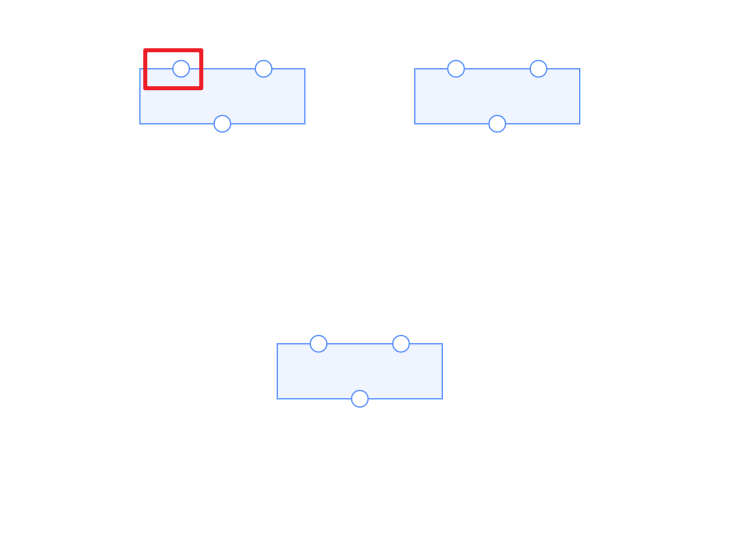
链接桩是节点上的固定连接点
# 链接桩基本操作
- 创建链接装
初始化图形的时候可以初始化图形的链接桩的数量样式等
graph.addNode({
  x: 60,
  y: 60,
  width: 160,
  height: 80,
  label: "Rect With Ports",
  ports: [{ id: "port1" }, { id: "port2" }, { id: "port3" }],
});
1
2
3
4
5
6
7
8
2
3
4
5
6
7
8
- 连接链接桩
graph.addEdge({
  source: { x: 40, y: 100 },
  target: {
    cell: rect,
    port: "port3", // 链接桩 ID
  },
});
1
2
3
4
5
6
7
2
3
4
5
6
7
- 设置样式
链接桩和节点等图形设置样式逻辑基本类似,都是通过
attrs属性来控制,属性选项attrs是一个复杂对象,该对象的Key是节点Markup定义中元素的选择器(selector),对应的值是应用到该 SVG 元素的 SVG 属性值(如fill和stroke)
attrs: {
  circle: {
    r: 6, //圆角
    magnet: true,//当 magnet 属性为 true 时,表示该元素可以被链接
    stroke: '#31d0c6', //边框高亮器,沿元素的包围盒渲染一个高亮的边框。
    strokeWidth: 2, //边框设置
    fill: '#fff',//填充色
  }
}
1
2
3
4
5
6
7
8
9
10
2
3
4
5
6
7
8
9
10
# 基本方法
链接桩可以通过操作链接桩来实现初始化之后的其他操作
- addPort: 添加单个链接桩。链接桩被添加到链接桩数组末尾。
- addPorts: 添加多个链接桩。链接桩被添加到链接桩数组末尾。
- removePort: 删除指定的链接桩。
- getPorts: 获取所有链接桩。
# 特色功能
# 拖拽
我们经常需要通过拖拽交互往画布中添加节点,如流程图编辑场景,从流程图组件库中拖拽组件到画布中。
import { Addon } from "@antv/x6";

const dnd = new Addon.Dnd(options);

dnd.start(node, e);
1
2
3
4
5
2
3
4
5
# 小地图
const graph = new Graph({
  scroller: {
    enabled: true,
  },
  minimap: {
    enabled: true,
    container: minimapContainer,
  },
});
1
2
3
4
5
6
7
8
9
2
3
4
5
6
7
8
9
# 布局
npm install @antv/layout --save
1
- 网格布局
- 环形布局
- Dagre
第三方布局插件dagre
import dagre from 'dagre'
  autoLayout() {
    let nodes = this.graph.getNodes()
    let edges = this.graph.getEdges()
    nodes = nodes.map(item => {
      return { id: item.id }
    })
    edges = edges.map(item => {
      return { source: item.source.cell, target: item.target.cell }
    })
    const data = { nodes, edges }
    const me = this
    const dagreLayout = new DagreLayout({
      type: 'dagre',
      rankdir: 'LR',
      align: 'UL',
      ranksep: 80,
      nodesep: 20,
      ranksepFunc(node) {
        const nc = me.graph.getCell(node.id)
        const sep = me.getNodeWidth(nc.data.name)
        return sep / 3
      }
    })

    const model = dagreLayout.layout(data)
    this.graph.freeze()

    model.nodes.forEach(node => {
      const nc = this.graph.getCell(node.id)
      if (nc) {
        nc.position(node.x, node.y)
      }
    })
    this.graph.unfreeze()
  }
1
2
3
4
5
6
7
8
9
10
11
12
13
14
15
16
17
18
19
20
21
22
23
24
25
26
27
28
29
30
31
32
33
34
35
36
2
3
4
5
6
7
8
9
10
11
12
13
14
15
16
17
18
19
20
21
22
23
24
25
26
27
28
29
30
31
32
33
34
35
36
上次更新: 2024/01/18, 10:44:15